Music bingo › Music bingo on the big screen
Music bingo on the big screen in the room
A music bingo on the big screen turns a loose crowd into one room: everyone looks at the same beamer, scans the same code and cheers at the same moment.
The venue screen of Bingo Banger runs in the browser via bingobanger.party and shows the game code, a QR to join, the standings and the winners — live, large, for the whole room. You just run the game from the app.


Scan the QR code with your phone, or tap a button if you are reading this on mobile.
The benefits of a venue screen
With a venue screen you no longer have to shout anything across the room. The game code and the QR are up there in large print, so guests hook in within seconds on their own phone. During the game they see the standings and who is close to a bingo, and when someone fills a card the winner appears on screen straight away. That makes it more exciting, more professional and a lot easier to host — especially in a busy pub, at a company party or in a large event hall.
What the venue screen looks like
The venue screen is a calm, dark display that stays readable from a distance. At the top is the large game code with a QR code next to it to join. Below it the game runs along: the song that is playing, a nearly-there bar that shows without names how many people need just one more song, and a standings board at every round change. The moment someone gets a valid bingo, the winner jumps into view. All in Bingo Banger's house style, with nothing to install.
How to put it on the screen from the app
In the app you open the venue screen for your game; it points to bingobanger.party with your game code in it. You put that display on the beamer or TV the way your room already does it: connect a laptop or media player over HDMI and open the link in the browser, or stream your phone or laptop screen via AirPlay or Chromecast to the big screen. Meanwhile your guests go to bingobanger.party, enter the game code or scan the QR, and play along for free on their own phone — no app and no account.
How to make this music bingo yourself
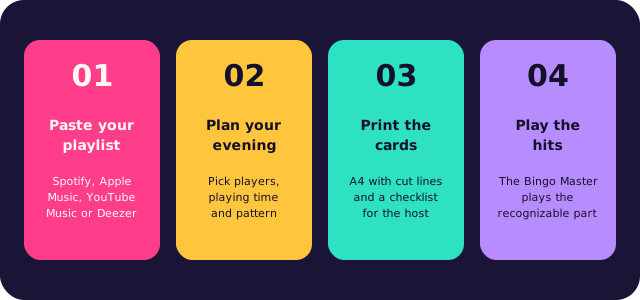
Paste your playlist
A link from Spotify, Apple Music, YouTube Music or Deezer, or type your own list of songs. The app collects the titles and removes duplicates.
Choose playing time and win pattern
The app works out how many songs you need and picks the card size.
Print the unique bingo cards
Two cards per A4 with cut lines, with a matching emoji above every title, plus a checklist for the host.
Play the hits
The Bingo Master plays the recognizable part of every song and verifies each bingo through the card code.
What music bingo asks of you
Traditional bingo runs on numbers; this game runs on songs, and that twist is what makes it fun. There is no number to hunt for: people listen to the opening seconds, recognise the hit and players mark it off. You do not need a professional host or a trivia round to get a room going, because the music does that for you. Most people know far more songs than they think.
Decide first what the evening should be. A short game of three rounds is perfect before dinner; a complete night of 90 minutes suits a party, a company event or a musical theme night. Whether your crowd grew up on the 90s or on last summer's charts, use their own music instead of a generic list: the best selection is the one where every player recognises something — a classic, a guilty pleasure, a recent hit. That is what gets people out of their seats.
The format is easy. Create the list, choose the card size and the win pattern, and give everyone a card with the song titles printed on it. Each song is played once, in a random order. The first person to fill a whole line shouts bingo, and the host verifies that call with the code along the side. Guests who would rather skip paper join online at bingobanger.party with your game code. Small prizes per round keep the energy up, and they do not have to be expensive.
Questions, or want a hand hosting your first game? Email robin@kreatrix.nl and we will come back to you within a working day. The app is free, six cards included.
Frequently asked questions
Do I need an extra device for the venue screen?
You need something to drive the beamer or TV: a laptop or media player over HDMI, or your phone or laptop streamed to the screen via AirPlay or Chromecast. The venue screen itself runs in the browser via bingobanger.party, so you install nothing.
Do my guests have to install an app?
No. With your game code everyone plays along for free on their own phone via bingobanger.party. They scan the QR on the screen or type in the code — no app, no account.
Does the venue screen work on any beamer or TV?
Yes, as long as you can show a browser on it. That can be via a connected laptop or media player, or by streaming your screen to it. The display adapts to the screen.
What do my guests see on the big screen?
The game code and a QR to join, the song that is playing, a nearly-there bar without names, the standings at every round change and the winner as soon as there is a full card. That way the whole room follows the same game.
More music bingo
Browse the other topics, or read on the main page how to make your own music bingo in ten minutes.
Popular themes: