Music bingo › The 2010s
2010s music bingo: the hits that defined the decade
The 2010s were the streaming decade, and you can hear it: hits got bigger and stayed around longer than ever. Anyone who was young in those years knows the songs from their own playlist rather than from the radio.
The app comes with a ready-made playlist called Oh my 2010s!. Pick it and you can play. Prefer to choose yourself? Paste a playlist from Spotify, Apple Music, YouTube Music or Deezer, or type the songs in one by one.


Scan the QR code with your phone, or tap a button if you are reading this on mobile.
Oh my 2010s! as your starting point
You will find Oh my 2010s! among the ready-made lists in the app, in the decade category. It holds the songs that defined those years, from Rolling in the Deep to Shape of You. Each one plays for 30 seconds, with a 3-second gong in between.
Pop, dance and hip-hop in one list
This was the decade when the genres blurred: a dance track with a pop vocal, a rap song with a chorus a whole stadium sings. Keep that mix in your list and the evening keeps moving. For an hour of play you need about 110 songs.
Who this theme is for
It works best with a crowd now aged between 25 and 40, because this was their music. At a 30th or 35th birthday it lands every time. Print the cards two per A4 with cut lines, or let everyone play on their own phone through bingobanger.party with the game code from the host.
Or grab the ready-made list
Rather not hunt for songs? The app has Oh my 2010s! waiting, curated and checked for playable previews. Open it, start it, play. Pasting your own playlist still works too.
Example songs for this theme
For inspiration: these are songs that tend to work well with this theme. You are not tied to any of them — you build your own list, so use them, extend them or ignore them completely.
- Rolling in the Deep — Adele
- Shape of You — Ed Sheeran
- Uptown Funk — Mark Ronson & Bruno Mars
- Happy — Pharrell Williams
- Wake Me Up — Avicii
- Get Lucky — Daft Punk
- Somebody That I Used to Know — Gotye
- Titanium — David Guetta & Sia
- Counting Stars — OneRepublic
- Closer — The Chainsmokers & Halsey
- One Dance — Drake
- Shut Up and Dance — WALK THE MOON
- Believer — Imagine Dragons
- TiK ToK — Kesha
- Someone You Loved — Lewis Capaldi
How to make this music bingo yourself
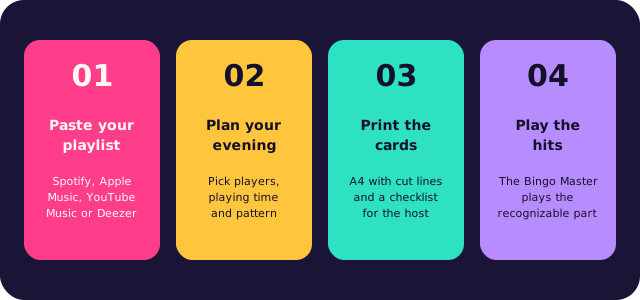
Paste your playlist
A link from Spotify, Apple Music, YouTube Music or Deezer, or type your own list of songs. The app collects the titles and removes duplicates.
Choose playing time and win pattern
The app works out how many songs you need and picks the card size.
Print the unique bingo cards
Two cards per A4 with cut lines, with a matching emoji above every title, plus a checklist for the host.
Play the hits
The Bingo Master plays the recognizable part of every song and verifies each bingo through the card code.
How a music bingo evening runs
Traditional bingo leans on numbers; this game leans on songs, and that one twist is what makes it fun. There is no number to find: people listen to the opening seconds, recognise the hit and players mark it off. You do not need a professional host or a trivia round to warm the room up, because the music takes care of that. Most people know far more songs than they think.
Settle first on what the evening should be. A short game of three rounds is perfect before dinner; a complete night of 90 minutes suits a party, a company event or a musical theme night. Whether your crowd grew up on the 90s or on last summer's charts, use their own music instead of a generic list: the best selection is the one where every player recognises something — a classic, a guilty pleasure, a recent hit. That is what gets people out of their seats.
The format is easy. Create the list, choose the card size and the win pattern, and give each guest a card with the song titles printed on it. Each song is played once, in a random order. The first person to fill a whole line shouts bingo, and the host verifies that call with the code along the side. Guests who prefer a screen join online at bingobanger.party with your game code. Small prizes per round keep the energy up, and they do not have to be expensive.
Questions, or want a hand hosting your first game? Email robin@kreatrix.nl and we will answer within a working day. The app is free, six cards included.
Frequently asked questions
Which years does this cover?
The hits from 2010 through 2019. Want a tighter window? Take out the songs that fall just outside your period yourself.
Is there a list waiting in the app?
Yes, the Oh my 2010s! playlist among the ready-made lists. Pick it and play. Pasting your own playlist or typing songs in also works.
How many songs do I need?
About 55 for half an hour, 110 for an hour and 164 for ninety minutes of play.
How big do the cards get?
That depends on your list. A small pool gives 3x3, a medium one 4x4 and a large one 5x5. The app picks the size for you.
More music bingo
Browse the other topics, or read on the main page how to make your own music bingo in ten minutes.
Popular themes: