Music bingo › Road trip music bingo
Make a road trip music bingo for the car
A music bingo in the car turns a long drive into the best part of the day: suddenly everyone in the back seat is listening closely, because there is a square to win.
With Bingo Banger you paste the road trip playlist you are already playing anyway, and the app turns it into unique bingo cards. Print them for the road, or let the passenger run the Bingo Master on the phone.


Scan the QR code with your phone, or tap a button if you are reading this on mobile.
The best way to pass the time on the road
Traffic jams, long motorways and 'are we there yet': a music bingo fills exactly that time. You play in rounds, so you can pause and pick it up again later. Give each round's winner the right to choose the next song, and the drive flies by.
Play safely — the passenger hosts
Let the driver drive and the passenger run the music. The Bingo Master plays the recognizable part of each song through the car speakers; connect your phone over Bluetooth or a cable to the car audio.
Cards on paper, handy on the road
On the road, paper is often more practical than a screen. Print two unique bingo cards per A4 beforehand, with an emoji above every title and a checklist for the host. Just cross them off with a pen from the back seat.
Example songs for this theme
For inspiration: these are songs that tend to work well with this theme. You are not tied to any of them — you build your own list, so use them, extend them or ignore them completely.
- Queen — Bohemian Rhapsody
- a-ha — Take On Me
- Journey — Don't Stop Believin'
- Fleetwood Mac — Go Your Own Way
- Toto — Africa
- Bruce Springsteen — Born to Run
- The Proclaimers — I'm Gonna Be (500 Miles)
- Tom Petty — Free Fallin'
How to make this music bingo yourself
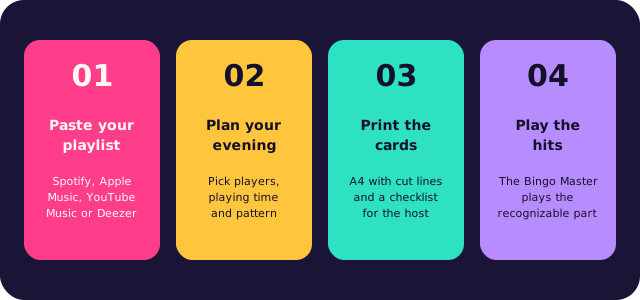
Paste your playlist
A link from Spotify, Apple Music, YouTube Music or Deezer, or type your own list of songs. The app collects the titles and removes duplicates.
Choose playing time and win pattern
The app works out how many songs you need and picks the card size.
Print the unique bingo cards
Two cards per A4 with cut lines, with a matching emoji above every title, plus a checklist for the host.
Play the hits
The Bingo Master plays the recognizable part of every song and verifies each bingo through the card code.
From playlist to music bingo night
Traditional bingo is built on numbers; this game is built on songs, and that twist is what makes it fun. Nobody looks up a number: people listen to the opening seconds, recognise the hit and players mark it off. You do not need a professional host or a trivia round to lift a room, because the music does it for you. Most people know far more songs than they think.
Work out first what the evening should be. A short game of three rounds is perfect before dinner; a complete night of 90 minutes suits a party, a company event or a musical theme night. Whether your crowd grew up on the 90s or on last summer's charts, use their own music instead of a generic list: the best selection is the one where every player recognises something — a classic, a guilty pleasure, a recent hit. That is what gets people out of their seats.
The format is easy. Create the list, choose the card size and the win pattern, and hand everyone a card with the song titles printed on it. Each song is played once, in a random order. The first person to fill a whole line shouts bingo, and the host verifies that call with the code along the side. Guests without paper join online at bingobanger.party with your game code. Small prizes per round keep the energy up, and they do not have to be expensive.
Questions, or want a hand hosting your first game? Email robin@kreatrix.nl and we will reply within a working day. The app is free, six cards included.
Frequently asked questions
Can I play in the car without internet?
The cards you made and printed beforehand work without a connection. Playing the clips does need internet, so make and print the cards at home and make sure you have coverage on the road.
Isn't it dangerous while driving?
Always let the passenger run the app and the driver only drive. With printed cards the passengers simply cross off with a pen, so no screen is needed up front.
How many songs do I need for a long drive?
Allow about 33 seconds per song. For an hour and a half of play you need around 164; the app works out the exact number from the playing time.
What music works best in the car?
Sing-alongs and recognizable classics the whole car has something with. You build your own list, so feel free to mix the music from the front and the back seat.
More music bingo
Browse the other topics, or read on the main page how to make your own music bingo in ten minutes.
Popular themes: