Music bingo › With Spotify
Make a music bingo from your Spotify playlist
You probably already have a playlist that would be perfect for a music bingo night: last year's party list, or the one you built with friends. Bingo Banger turns it into a complete game in ten minutes.
Paste the link of your Spotify playlist, choose how long you want to play and print the cards. You need no Spotify account and no Premium: playback uses official previews available to everyone.


Scan the QR code with your phone, or tap a button if you are reading this on mobile.
Copying your playlist link
Open the playlist in Spotify, click the three dots, choose share and copy the link. You get an address starting with open.spotify.com. Paste that into step 1. Make sure the playlist is public, otherwise we cannot read it.
Which playlists work best
Lists of well-known songs beat lists of personal favourites nobody recognises. In music bingo, recognition matters more than taste. A good rule: if you doubt whether anyone knows the song, leave it out.
Using someone else's playlist
That is fine too. Any public Spotify playlist works, so you can take an existing party or decade list as your base and then add a few songs that suit your particular crowd.
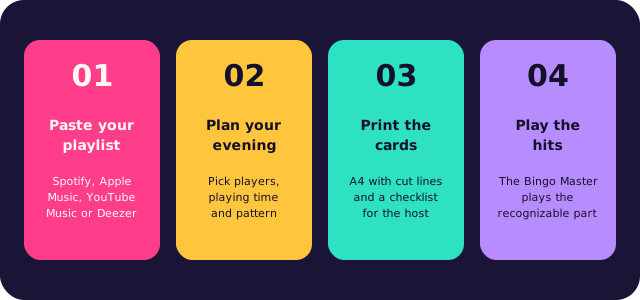
How to make this music bingo yourself
Paste your playlist
A link from Spotify, Apple Music, YouTube Music or Deezer, or type your own list of songs. The app collects the titles and removes duplicates.
Choose playing time and win pattern
The app works out how many songs you need and picks the card size.
Print the unique bingo cards
Two cards per A4 with cut lines, with a matching emoji above every title, plus a checklist for the host.
Play the hits
The Bingo Master plays the recognizable part of every song and verifies each bingo through the card code.
How a music bingo evening runs
Traditional bingo leans on numbers; this game leans on songs, and that one twist is what makes it fun. There is no number to find: people listen to the opening seconds, recognise the hit and players mark it off. You do not need a professional host or a trivia round to warm the room up, because the music takes care of that. Most people know far more songs than they think.
Settle first on what the evening should be. A short game of three rounds is perfect before dinner; a complete night of 90 minutes suits a party, a company event or a musical theme night. Whether your crowd grew up on the 90s or on last summer's charts, use their own music instead of a generic list: the best selection is the one where every player recognises something — a classic, a guilty pleasure, a recent hit. That is what gets people out of their seats.
The format is easy. Create the list, choose the card size and the win pattern, and give each guest a card with the song titles printed on it. Each song is played once, in a random order. The first person to fill a whole line shouts bingo, and the host verifies that call with the code along the side. Guests who prefer a screen join online at bingobanger.party with your game code. Small prizes per round keep the energy up, and they do not have to be expensive.
Questions, or want a hand hosting your first game? Email robin@kreatrix.nl and we will answer within a working day. The app is free, six cards included.
Frequently asked questions
Do I need Spotify Premium for music bingo?
No. The app plays official previews of 30 seconds. You need neither Premium nor even an account.
How do I turn my Spotify playlist into bingo cards?
Copy the share link of your playlist, paste it into the Bingo Banger app, choose your playing time and print the cards.
Can I use somebody else's playlist?
Yes, any public playlist works.
How many songs should my playlist contain?
The app reserves about 33 seconds per song, so roughly 110 for an hour of play.
More music bingo
Browse the other topics, or read on the main page how to make your own music bingo in ten minutes.
Popular themes: